

What's new
VORON Design

Register a free account today to become a member! Once signed in, you'll be able to participate on this site by adding your own topics and posts, as well as connect with other members!

Question Lost communication with MCU 'EBBCan'

maestro

Member
I'm experiencing a random connection issue and am seeking assistance with resolving it. I have a Voron 2.4 Formbot kit with BTT Manta M8P 2.0 + CB1 connected to EBB SB2209 CAN V1.0 (RP2040) via CAN. Randomly, during the printing, I'm getting an error "Lost communication with MCU 'EBBCan' Once the underlying issue is corrected, use the "FIRMWARE_ RESTART" command to reset the firmware, reload the config, and restart the host software. Printer is shutdown". This could happen after 3 minutes of printing, or after 30-40 minutes, or not occur during more than 1 hour of printing. After a firmware restart, everything is back to normal, and a new print can be started again right away.

What I've tried/did so far:
  1. Upgraded Klipper to the latest version and reflashed the latest version of firmware everywhere.
  2. As was described in the GitHub issue https://github.com/bigtreetech/EBB/issues/164, I added grounding for the extruder motor.
  3. Unfolded the CAN cable and removed it from the case.
  4. Tried checking connections, detached/reattached cables.
  5. Disassembled and assembled the toolhead to make sure the extrusion is smooth and the filament does not get stuck.
  6. Verified voltage on the PCU during the print - stable 24.2V, no drops.
  7. Bought another EBB SB2209 CAN V1.0 (RP2040) + cable and replaced everything (board and cable one by one).
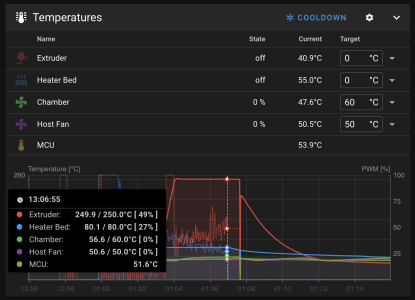
  8. Track the temperature of EBB. It's in operational limits and does not get higher than 60-65 degrees.
Screenshot 2025-08-10 at 13.16.15.png

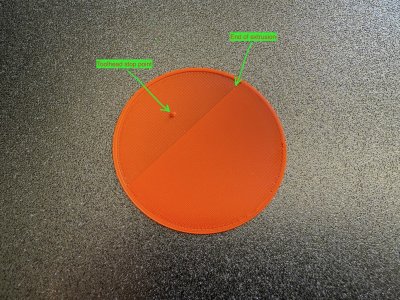
Nothing from above helped. Random disconnects continue. Another thing I noticed is that it looks like the toolhead continues moving even after the filament has already stopped extruding. The following picture demonstrates this. Another thing I noticed is that all interruptions occur during the solid infill printing.
IMG_5228.jpeg

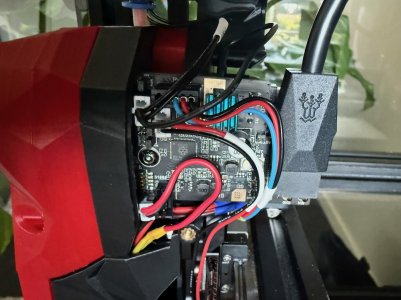
I'm attaching logs and my assembly photo (I use a cable fastening clip "EBB SB2240_2209 CAN/CAD/Printed_Part_for_CAN_Cable_V1.2.STEP" to immobilize the connection, but it is detached in this photo).
IMG_5229 copy.jpeg

I'm also attaching my logs. I would appreciate any help with this.
 

Attachments

I'm not sure how good the CAN implementation is in the M8P. You could try adding a BTT U2C usb->can interface and connecting that via usb to your M8P. I have one and have never had a can issue I couldn't directly attribute to a dodgy cable connection.
 
I'm not sure how good the CAN implementation is in the M8P. You could try adding a BTT U2C usb->can interface and connecting that via usb to your M8P. I have one and have never had a can issue I couldn't directly attribute to a dodgy cable connection.
Thank you for the suggestion. I have not thought about it. That is a good idea, and I probably need to get a BTT U2C USB-to-CAN interface to try it. I will post an update here once I get one. In the meantime, I have also created a GitHub issue for BTT, but I have not received any replies there yet: https://github.com/bigtreetech/EBB/issues/169.
 
Finally, it looks like I resolved the issue. The root cause, most likely, was not in the hardware. I'm using Armbian as an OS on my host, and I had an issue with its configuration. During the initial setup, I had a problem with the networking settings, and it did not work properly. I reinstalled everything from scratch using the latest available versions, including Armbian, and carefully configured all networks, and the problem is gone. I put together a couple of step-by-step configuration tutorials for myself, but maybe they will be useful for someone else:
- https://github.com/oleksii-suprun/klipper-voron24-300/blob/main/doc/cb1_networkmanager_guide.md
- https://github.com/oleksii-suprun/klipper-voron24-300/blob/main/doc/can0_setup_guide.md
- https://github.com/oleksii-suprun/klipper-voron24-300/blob/main/doc/manta_m8p_can_setup_guide.md
 
Hi. I had the same problem. I thought I solved it by putting a capacitor on the EBB board's power contacts. The problem went away for a while (I was printing projects lasting over 20 hours), but a couple of days ago it returned.

In the process of fixing it, I replaced almost everything—the power supply, the EBB board, the cable. I updated the firmware numerous times. I filmed the error and discovered that before the klipper displays an error, the EBB microcontroller simply reboots (I programmed the MSU bootloader to turn on the red LED during boot, and turn it off when the klipper is activated).

Apparently, this is some kind of defective EBB board.

But.... What heater do you have on you hotend ? My is Torlipy 70W 6*20 мм для E3D V6 Volcano...

P.S. I changed hotend to Revo (40W heater and result the same).
 
Last edited:
Hello. The issue returned for me as well. I worked for some time (perhaps by luck), but the problem reappeared after a month or so. The print stops with the same error after 5-7 minutes. I put all the details here https://github.com/bigtreetech/EBB/issues/169.

I have a Formbot kit with Manta M8P + BTT EBB 2209. I have an E3D Revo hotend with a 60W header and HF nozzle. As an attempt to fix, I already did the following things, but nothing helped:
  1. Tried another BTT EBB 2209 board and cable.
  2. Attempted to reduce the extruder motor current.
  3. Reduce max extrusion rate from 20 mm3/s to 8 mm3/s
  4. Reduce print speed.
  5. Replace the Manta M8P built-in CAN bridge with an external USB-to-CAN adapter (BTT U2C https://github.com/bigtreetech/U2C).
  6. Reflash everything and reduce the CAN bitrate from 1000000 to 500000.
  7. Swiched from CB1 to CM4
Nothing from above helped. However, after several experiments today, I discovered that all prints finish successfully when I run them as a "dry run" (printing without filament). Even reprinting the same G-Code without filament completes successfully and fails with filament. It seems that for me, the problem could be narrowed to heating or extrusion.

@Regressor, I hope the summary above gives you information about my setup. Could you please also share information on what the power of your new PSU is? Is it the same 200W or greater?
 
Last edited:
Yes, everything was configured to 1000000, then everything was reconfigured (including can0 network) to 500000.

I had a chat with some folks on Voron Discord and several people agreed the issue is most likely because of a bad cable connection due to a missing strain relief. Yesterday I disassembled tool head and extracted the EBB board but did not see any visible damage. I will try to take a closer look today and probably try to re-solder the connection. The main issue is that even this is a bad connection because of a strain, to print a strain relief I have to have an operational printer. It looks like a "chicken and egg" problem.
 
Yes, those moving toolheads can cause some errant issues. I had a thermistor that had a loose connection, but every time I took it apart to find the issue, it presented as nothing and was strong. Somehow it was moving JUST enough while printing, and I couldn't reproduce it manually...last E3D product I'll ever use.
 
I ran into the very same error message, occurring with EBB36.
Finally it was an occasional bad male-to-female connection inside the connector.
Re-crimped the pins, then I made a 70mm TPU extension sleeve for the CAN cable a) to precisely attach to the outlet, and b) to mate the cable with EBB38 without bending.
I was already worried if PCB connector-pins re-soldering would be the next step.
 
In the graph above, your hotend temps drop to room temp just before 1:08 and then back up, in the space of a second or two.

@maestro It also looks like this happened before disconnect message, is that correct?
 
In the graph above, your hotend temps drop to room temp just before 1:08 and then back up, in the space of a second or two.

@maestro It also looks like this happened before disconnect message, is that correct?
No, that happens because of the lost communication. The temperature goes back after a restart.
 
I want to share some exciting news. Finally, after months of debugging, trial and error, and multiple conversations on the Voron Discord with other folks who have absolutely the same issue, I got the problem with the toolhead board disconnecting solved.

Yesterday, I received the LDO Nitehawk board, and today, I switched from EBB SB2209 CAN RP2040 to Nitehawk, and it seems the issue is solved now. The same file previously failed to print a dozen times but completed successfully. So, I assume the root cause was in the BTT EBB board.
 
I had an issue with my thermistor (wire loose but held in place by a piece of heatshrink), so it appeared fine...
Print after print failed reporting temperature issues but during the early part of this issue, I had quite a few crashes siting communication issues.

Since re-crimping the thermistor wire, no issues with temperatures but also, no more crashes either... I hope I didn't speak too soon ;)
 
I want to share some exciting news. Finally, after months of debugging, trial and error, and multiple conversations on the Voron Discord with other folks who have absolutely the same issue, I got the problem with the toolhead board disconnecting solved.

Yesterday, I received the LDO Nitehawk board, and today, I switched from EBB SB2209 CAN RP2040 to Nitehawk, and it seems the issue is solved now. The same file previously failed to print a dozen times but completed successfully. So, I assume the root cause was in the BTT EBB board.

I am experiencing the same issue, so I'm reading this topic (and others) regarding that issue.
When I set up my Voron 2.4 with EBB SB2209 CAN V1.0 (RP2040), everything worked fine. I then placed my printer down to the cellar, and then the issue appeared. Not being able to print items which last more than round about half an hour...

You wrote, you replaced the complete EBB SB2209 CAN board, and the issue still persisted? As my setup was working perfectly at the beginning I assume the EBB SB2209 CAN board basically is ok, but might get damaged over time. But as you have replaced this board, that assumption is not likely.

Currently (since today) my Voron is running since several hours, without having changed anything so far, except one thing: I placed the printer outside, where it's cold (4 degree). So my current assumption is that it might as well be a heat issue anywhere in the bottom of a Voron. That might be possible...perhaps the cooling of the mainboard BTT Pi and its components including the CAN adapter is very sensitive?

We need to get it further observed: I cannot really believe that putting my printer outside should resolve the issue. But another CAN board (LDO Nitehawk board) is also not a perfect solution...it basically means that the EBB SB2209 CAN V1.0 (RP2040) does not work properly, but it worked at the beginning (on my side at least).

Kind regards,
Martin
 
The EBB board has a 2209 driver with small heat-sink on it, this is probably the only component that can cause issues due to overheating, hence the small heat-sink.
While watching videos, I noticed quite a few people has added a small fan to cool the EBB board and/or 2208 driver, I guess it's worth trying...

I have been running my 2.4 for two years, I've had four communication errors so far... I never found the cause, perhaps it was over-heating. I might add a fan if it pops up again ;)
 
The EBB board is inside the stealthburner, as such, within the case. So the stepper does not seem to be the problem on my side, as the chamber is closed and heated.
Most likely there may be several reasons for this "behaviour", but on my setup it seems to be something inside the electronic bay at the bottom of the Voron, which fails with a CAN bus error when not cooled enough. Unfortunalety it is difficult to trace, as the error vanishes as soon as I switch off the printer for 10 seconds...so I need to examine it with some temperature sensor exactly when it is failing to detect what might get overheated.

Kind regards,
Martin
 
I fitted four temperature sensors inside the electronics bay to monitor things and allow for quieter operation (I like quiet, Noctuia Fans everywhere).
I tend to run fans slow and automatically increase speed dependent on temps, that way the electronics bay never gets hot and noise is kept to a minimum...
 
Top