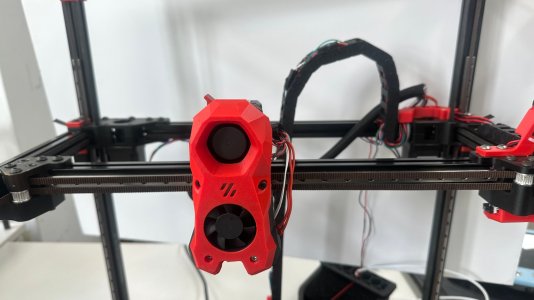

- Printer Model
- Voron 2.4 350mm
Hello,
I'm building a Voron 2.4 350mm and running into a CoreXY movement issue after one of my X-axis belts came loose and I had to re-insert it into the toolhead.
Here is my current movement behavior:
- X+ → toolhead moves correctly in X+ only
- X- → toolhead moves diagonally in both X- and Y-
- Y- → toolhead moves correctly in Y- only
- Y+ → toolhead moves diagonally in both X+ and Y+
I also noticed that the X-axis belt appears slightly loose when the toolhead moves sideways.
My setup:
- Board: BIGTREETECH Manta M8P V2.0
- Firmware: Klipper
- Frame size: 350mm
- Kinematics: CoreXY (confirmed in printer.cfg)
Things I have already checked:
- Motor directions in printer.cfg (tried reversing dir_pin for both X and Y but it just breaks homing)
- X and Y endstops are working correctly (TRIGGERED/open states confirmed)
- G28 X Y homes successfully to the correct corners (X to right, Y to rear)
Before printing, the Z-axis end stop must be recognized, but since movement in the X-axis and Y-axis directions is not performed accurately, the Z-axis groove cannot be specified, so printing is not possible.
Has anyone seen this kind of asymmetric diagonal movement before? Any advice on what to check would be really appreciated!
Thanks
I'm building a Voron 2.4 350mm and running into a CoreXY movement issue after one of my X-axis belts came loose and I had to re-insert it into the toolhead.
Here is my current movement behavior:
- X+ → toolhead moves correctly in X+ only
- X- → toolhead moves diagonally in both X- and Y-
- Y- → toolhead moves correctly in Y- only
- Y+ → toolhead moves diagonally in both X+ and Y+
I also noticed that the X-axis belt appears slightly loose when the toolhead moves sideways.
My setup:
- Board: BIGTREETECH Manta M8P V2.0
- Firmware: Klipper
- Frame size: 350mm
- Kinematics: CoreXY (confirmed in printer.cfg)
Things I have already checked:
- Motor directions in printer.cfg (tried reversing dir_pin for both X and Y but it just breaks homing)
- X and Y endstops are working correctly (TRIGGERED/open states confirmed)
- G28 X Y homes successfully to the correct corners (X to right, Y to rear)
Before printing, the Z-axis end stop must be recognized, but since movement in the X-axis and Y-axis directions is not performed accurately, the Z-axis groove cannot be specified, so printing is not possible.
Has anyone seen this kind of asymmetric diagonal movement before? Any advice on what to check would be really appreciated!
Thanks