
What's new
VORON Design

Register a free account today to become a member! Once signed in, you'll be able to participate on this site by adding your own topics and posts, as well as connect with other members!

My 2.4 first layer cannot be printed

shijian

New member
Printer Model
voron2.4R
Extruder Type
Other
Cooling Type
Other
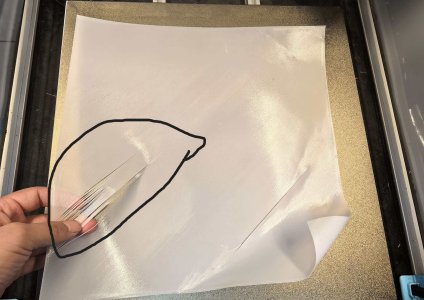
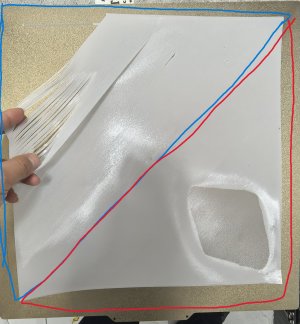
This printer has been running for over a year and hasn't been able to print for many hours. Recently, the first layer of printing has suddenly stopped. The z-offset and mesh bed have been recalibrated, and every time they print, the top left corner splits, while the bottom right corner is always good. I don't know why, but the z-offset and mesh bed have been calibrated several times。400X400X400


OrcaSlicer software G-code

M190 S[bed_temperature_initial_layer_single]
M109 S[nozzle_temperature_initial_layer]
PRINT_START EXTRUDER=[nozzle_temperature_initial_layer] BED=[bed_temperature_initial_layer_single]
; You can use following code instead if your PRINT_START macro support Chamber and print area bedmesh
; PRINT_START EXTRUDER=[nozzle_temperature_initial_layer] BED=[bed_temperature_initial_layer_single] Chamber=[chamber_temperature] PRINT_MIN={first_layer_print_min[0]},{first_layer_print_min[1]} PRINT_MAX={first_layer_print_max[0]},{first_layer_print_max[1]}
1.jpg
 

Attachments

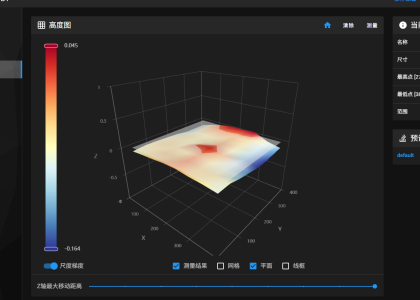
The deviation is quite high -0.003679 to -0.162429 as against mine at 0.005000 to -0.015000 ...
That's almost a full layer at 0.2, what do you get if the bed is at 50° C before bed meshing?

Assume it printed fine previously?

1 Print a small square 50x50mm in the top left of the bed a few layers thick, does it adhere?
2 (If so), Print the same square bottom right (don't print them together), does it adhere?

Trying to determine whether or not it's mechanical or software problem... I'm no expert but right now it looks like warping...
 
The deviation is quite high -0.003679 to -0.162429 as against mine at 0.005000 to -0.015000 ...
That's almost a full layer at 0.2, what do you get if the bed is at 50° C before bed meshing?

Assume it printed fine previously?

1 Print a small square 50x50mm in the top left of the bed a few layers thick, does it adhere?
2 (If so), Print the same square bottom right (don't print them together), does it adhere?

Trying to determine whether or not it's mechanical or software problem... I'm no expert but right now it looks like warping...
The 50 ° mesh bed is leveled for printing, but there is still a fork in the first layer of printing in the upper left corner
 

Attachments

  • lower right corner(2).jpg
    lower right corner(2).jpg
    523.7 KB · Views: 2
  • lower right corner(1).jpg
    lower right corner(1).jpg
    540.7 KB · Views: 2
  • lower left corner(2).jpg
    lower left corner(2).jpg
    568.2 KB · Views: 2
  • lower left corner(1).jpg
    lower left corner(1).jpg
    514.9 KB · Views: 2
So it corrects quite a bit when warmed up?

The lower left and lower right are showing profile, what is their bases like (side touching bed)?

Questions:
What was 1st layer height?
Assume self sourced build?
*Aluminum bed thickness?
What probe are you using, Tap Clicky, other...
Do you run the localized bed meshing (KAMP)?

It's a 400mm bed, that's huge, difficult to get a machined uniformly flat bed that stays flat when heated.
Manual repair (sanding/grinding) is possible but tedious, machine shop is preferred.

According to google AI,
Code:
A 3D printer's bed mesh can correct for typical bed warping or unevenness,
often compensating for variances up to 0.5mm to 1.5mm,
but aiming for under 0.1mm (100 microns)
So your 0.2 deviation should not be an issue but...

Judging from first and last images, pressure advance needs work (I think it's pressure advance)...
 
Last edited:
So it corrects quite a bit when warmed up?

The lower left and lower right are showing profile, what is their bases like (side touching bed)?

Questions:
What was 1st layer height?
Assume self sourced build?
*Aluminum bed thickness?
What probe are you using, Tap Clicky, other...
Do you run the localized bed meshing (KAMP)?

It's a 400mm bed, that's huge, difficult to get a machined uniformly flat bed that stays flat when heated.
Manual repair (sanding/grinding) is possible but tedious, machine shop is preferred.

According to google AI,
Code:
A 3D printer's bed mesh can correct for typical bed warping or unevenness,
often compensating for variances up to 0.5mm to 1.5mm,
but aiming for under 0.1mm (100 microns)
So your 0.2 deviation should not be an issue but...

Judging from first and last images, pressure advance needs work (I think it's pressure advance)...
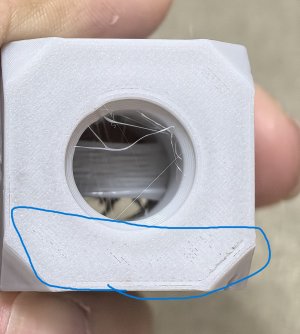
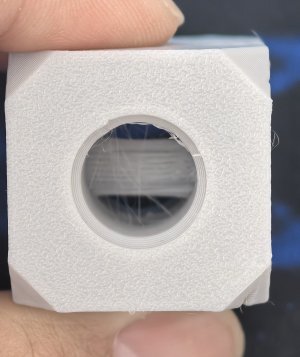
Sorry for the typo. It should be the top left corner (2) and bottom right corner (1). Only the bottom of the bottom right corner (1) can be used, and the bottom of the top left corner (2) cannot be used (the top left and bottom right corners indicate the position of the printing board). The leveling is done using TAP, with a layer height of 0.2mm and a hot bed thickness of approximately 8.5mm. The hot bed is processed by CNC
 
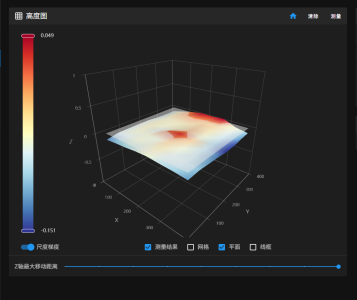
Best to visualize the map as it does indeed look like the bed needs work...

With bed cold, go to HEIGHTMAP and run CALIBRATE...
Set Scale z-max to the middle, take a screenshot and post it...

Might as well heat bed to 40° C, run CALIBRATE again, take another screenshot and post it...

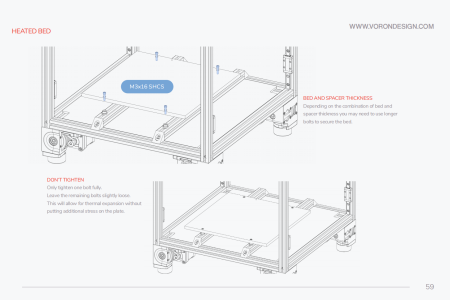
How is bed attached to frame? (just checking if bed is under any strain)... Is the frame 20mm extrusions?

You could try loosening the screws securing the bed just in case you are introducing strain if frame is off...
Could try another calibrate and see if any improvements...

I'm almost certain the bed is not ground flat but as WC Fields said when caught reading the bible by a reporter, "I'm looking for loop-holes" ;)
Mike
 
Best to visualize the map as it does indeed look like the bed needs work...

With bed cold, go to HEIGHTMAP and run CALIBRATE...
Set Scale z-max to the middle, take a screenshot and post it...

Might as well heat bed to 40° C, run CALIBRATE again, take another screenshot and post it...

How is bed attached to frame? (just checking if bed is under any strain)... Is the frame 20mm extrusions?

You could try loosening the screws securing the bed just in case you are introducing strain if frame is off...
Could try another calibrate and see if any improvements...

I'm almost certain the bed is not ground flat but as WC Fields said when caught reading the bible by a reporter, "I'm looking for loop-holes" ;)
Mike
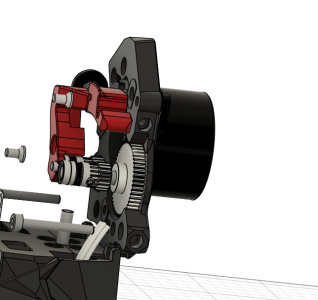
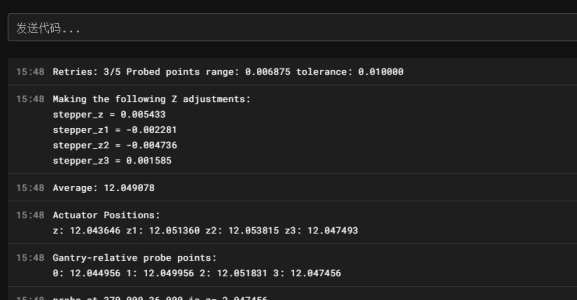
I have sent an error of 0.00687 for the leveling of the TAP gantry with 40 ° and 50 ° mesh bed detection. The installation of the hot bed is also based on VORON's official installation, and the extruder used is a process extruder, which is also official
What do you mean by setting Scale z-max as the middle?
 

Attachments

  • 40°.png
    40°.png
    107.5 KB · Views: 0
  • 50°.png
    50°.png
    93 KB · Views: 0
  • 2026-01-07 154832.png
    2026-01-07 154832.png
    48 KB · Views: 0
  • 2026-01-07 155914.png
    2026-01-07 155914.png
    394.4 KB · Views: 0
  • 2026-01-07 162025.png
    2026-01-07 162025.png
    158.3 KB · Views: 0
Top