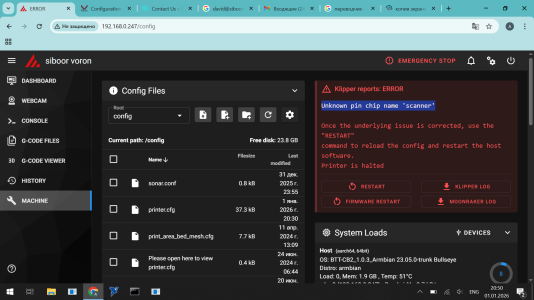
Siboor Voron 2.4r2, BTT Octopus Pro 1.0 + BTT SB2209 RP2040 + Cartographer. I've attached my printer.cfg
but the relevant sections regarding Cartographer are below.
Cartographer supposedly is already flashed but I would do it since there may be newer firmware especially
if you're using a Cartographer v3.
This is straight out of my printer.cfg, note that there's no [scanner] section. Most of the examples for the
cartographer section of the printer.cfg are outdated since they are based on an older version of Klipper.
#####################################################################
## MCU Cartographer V3 (ADXL 345)
#####################################################################
[mcu cartographer] # See
https://www.klipper3d.org/Config_Reference.html#mcu
canbus_uuid: 9168a0c3c195 ##use the one you got when setting up Katapult and Klipper.
## restart_method: command # Not needed for probes using CAN.
[cartographer]
mcu: cartographer
x_offset: 0 # This is the offset of your probe from the nozzle tip, to the center of the coil.
y_offset: 22 # This is the offset of your probe from the nozzle tip, to the center of the coil.
verbose: yes # For extra output
[adxl345]
# Select 1 of the cs_pin below depending on the probe you have.
# Having the wrong one selected will cause an Endless Bootloop
# Cartographer V4 has int2 connected to the probes PA1 pin
cs_pin: cartographer

A3 # For Cartographer V3
## cs_pin: cartographer
A0 # For Cartographer V4
spi_bus: spi1
[resonance_tester]
accel_chip: adxl345
probe_points: 175, 175, 20 # Fill out the blank with x and y coordinates where you want to run the resonance test.
[safe_z_home]
home_xy_position: 175,175 # Example home_xy_position: 175,175 - This would be for a 350 * 350mm bed.
z_hop: 10 # Z axis hop height after homing.
#####################################################################
## Z0-axis on MOTOR_2 (left front)
#####################################################################
[stepper_z]
step_pin: PF11 # Z-axis motor pulse pin
dir_pin: PG3 # Z-axis motor direction pin setting
enable_pin: !PG5 # Z-axis motor enable pin setting
rotation_distance: 40 # Active pulley circumference mm (2GT-20T pulley 40, 2GT-16T pulley 32)
gear_ratio: 80:16 # reduction ratio
microsteps: 32 # microsteps
endstop_pin: probe:z_virtual_endstop
homing_retract_dist: 0
## position_endstop is the distance of the Z limit pin trigger point from the print surface.
## Positive value = above the termination point of the platform,
## Negative value = termination point below the plateau.
## Increasing the value of position_ endstop will bring the nozzle closer to the bed.
## After running Z_ENDSTOP_CALIBRATE, position_endstop will be stored at the end of the CFG configuration.
##position_endstop: 0.5 # Modified as per actual
position_max: 340 # Maximum Z-axis print height 350mm=340
position_min: -5 # Soft Limit Minimum Stroke
homing_speed: 50 # Reset speed - maximum 20
second_homing_speed: 3 # Secondary reset speed - maximum 10
#--------------------------------------------------------------------
[tmc2209 stepper_z] # TMC2209
uart_pin: PC6 # drive communications port
interpolate: true # Whether to enable 256 microstep interpolation
run_current: 0.8 # Motor running current value(mA)
hold_current: 0.8 # holding current(mA)
sense_resistor: 0.110 # Do not change the drive sampling resistor
stealthchop_threshold: 200 # Mute threshold