
What's new
VORON Design

Register a free account today to become a member! Once signed in, you'll be able to participate on this site by adding your own topics and posts, as well as connect with other members!

Self sourced 2.4 R2. My first 3D printer ever

Found a post on discord that said,
"but as to your actual problem, I think telsler is right. anywhere you have spaces BEFORE a [ ] section, I think that is trouble
so go through, and all section headers, aka stuff like [gcode_macro PAUSE]. make sure the [ is the first character on that line
I had a space in front of the [gcode_macro BED_MESH_CALIBRATE] I just pasted in to fix the previous error message.
Got rid of that space and I'm back to the same error message: Existing command 'BED_MESH_CALIBRATE' not found in gcode_macro rename

Pumped that into discord search and found out I didn't have a [BedMesh] in my printer.cfg.
Found one here: https://docs.vorondesign.com/tuning/secondary_printer_tuning.html

I do have some/3 bell warnings about moonraker. But maybe those can wait.
Onward toward my next puzzle.

After all the wiring is done and you hit the ON switch,
Are the fans on the stealthburner supposed to start running?
 
I used pin PA1, the bolt on the end that is normally used for the bed heater, for the hot end heater.
I guess all the kids are doing it.
Since the bed heater is controlled by an SCR that doesn't draw much, it's connected to HE0.
The hot end should draw more and PA1 is built to handle more amps.
The reason it didn't work, is because I had the hot end connected to the 24 volt bolt.
Apparently the hot end is supplied power at all times and is controlled by the negative wires.
Even though it's controlled by the negative post I still have it designated as PA1 in printed.cfg, not BED-P.
And it's working great now.

Next, things are going to start moving. Maybe in the right direction, if I wired the steppers properly.
 
Running through the BUZZ command.
If the stepper motor oscillates in an incorrect direction, then it generally indicates that the “dir_pin” for the axis needs to be inverted. This is done by adding a ‘!’ to the “dir_pin” in the printer config file.
That means put the ! in front of the pin like this: dir_pin: !PF12 not in front of the whole line.
So I must have wired them wrong, glad there is an easy fix instead of having to depin and swap wires.
I am wonder what this means:
The STEPPER_BUZZ command will cause the given stepper to move one millimeter in a positive direction and then it will return to its starting position.
What is a "positive direction"? I took it to mean away from the outer edge of the machine.
So I had to invert Y but not X.

Seemed like it was moving more than 1mm so I changed rotation distance from 40 to 30 in X and Y
Well in a world where up is down and right is forward,.. it would be moving great, ha.
 
I bought it back into the world where up is up and right is not forward.
Next my probe is always triggered so I can't move the gantry down.
Doesn't change if I push the klicky probe switch or not. Even though the blue klicky light goes out when I push the switch upward.
Probably another wiring problem.
 
Found this thread on here and with octopus V1.1 hartK 2-piece board the klicky is supposed to be plugged into J34 with ^PG15 pin in printer.cfg. instead of the J40/PB7 plug.
The ^ enables the pullup resistor.
The probe trigger works now.
 
Setting up auto z calibration and got this error:
Option 'probe_nozzle_x' is not valid in section 'z_calibration'

I guess they updated the syntax or whatever it's called.
This topic helped me understand:

the new standard that uses nozzle_xy_position instead of the old probe_nozzle_x and probe_nozzle_y.

Deleted the old cfg file with the "probe_nozzle_x" style and pasted the z-calibration cfg from here:

Included it in the printer.cfg with the proper _ or - that matched the name of my klicky-z-calibration and no errors,.. for now.
 
I am still here.
Took along break from building the printer.
Now coming back to it and doing some updates and figuring out new problems.
I get an error:
Unable to parse option 'fan_speed' in section 'heater_fan hotend_fan'

I keep finding that a simple indent or uncomment has cured it for others but I don't see anything wrong in the area following it:
## Hotend Fan - FAN1
[heater_fan hotend_fan]
pin:PE5
max_power: 1.0
kick_start_time: 0.5
heater: extruder
heater_temp: 50.0
## If you are experiencing back flow, you can reduce fan_speed
fan_speed: 0.5

## Controller fan - FAN2
# [controller_fan controller_fan]
# pin: PD12
# kick_start_time: 0.5
# heater: heater_bed
# fan_speed: 0.5

## Exhaust fan - FAN3
# [heater_fan exhaust_fan]
# pin: PD13
# max_power: 1.0
# shutdown_speed: 0.0
# kick_start_time: 5.0
# heater: heater_bed
# heater_temp: 60
# fan_speed: 1.0
 
I see there is a silly face on a section of the code where I didn't put a space after a colon.
I put the space but still have the same error message.
So I started looking for examples and found this one:

[heater_fan hotend_fan]
## Hotend Fan - CNC_FAN1
pin: PE5
max_power: 1.0
kick_start_time: 0.5
heater: extruder
heater_temp: 50.0
## If you are experiencing back flow, you can reduce fan_speed
#fan_speed: 1.0

And mine:
## Hotend Fan - FAN1
[heater_fan hotend_fan]
pin: PE5
power_max: 1.0
kick_start_time: 0.5
heater: extruder
heater_temp: 50.0
## If you are experiencing back flow, you can reduce fan_speed
fan_speed: 1

I changed mine to match the example
changed to max_power instead of power_max and commented out the fan_speed
but still have the same error message.
 
Is auto z not supported anymore?
klicky-z-calibration is no longer in the klipper macros list.
I also tried uploading it to klipper/klippy/extras using winscp but it never showed up in the config files list.
Tried SSHing it in too
 
Last edited:
I'm still plogging away at this.
Sometimes wondering if I'm in over my head, then I reach the surface and get a gasp of air.
I actually had it doing a QGL, auto z was working great checked the bed for flaness.
Took a break while I figured out how to enclose it and mount the spool.
Found clicky-clack door idea and glad I didn't use the 2 swinging front doors.
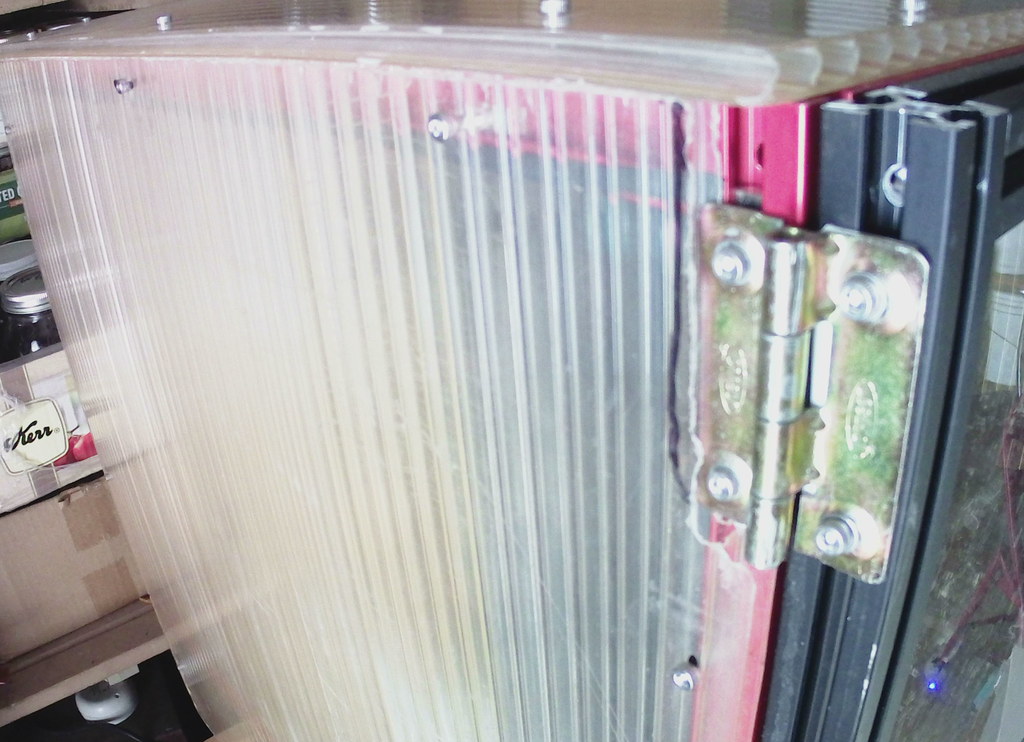
I don't have a printer to print up parts link hinges for the clicky_ clack door so I used bifold door hinges.
Metal and they work great.
Got back to it and did an upgrade,... then autoz didn't work anymore.
Started from scratch and relearned everything. Got it back to QGL, almost.
I was having bad connections with WIFI and it kept disconnection.
So I tried to connect it through the ethernet cable using this:
Video by the same folks:

Now I can't even get into the Pi. raspberrypi.local worked before. But not now.
Can't SSH into it using putty anymore. It just times out. Same problem many people had in the comments on the video.
Maybe should have read the comments first.
Tried to find it using angry IP scan and couldn't find the Pi.
What are my options?
Maybe hook a screen up to the Pi to find the IP address?
Or do I need to start all over again with the software/firmware?
 
OK I was able to use putty, not sure what changed.
Maybe just shutting things off and coming back to it later?
IF config looks like this:
pi@raspberrypi:~ $ ipconfig
-bash: ipconfig: command not found
pi@raspberrypi:~ $ ifconfig
eth0: flags=4163<UP,BROADCAST,RUNNING,MULTICAST> mtu 1500
ether b8:27:eb:35:62:17 txqueuelen 1000 (Ethernet)
RX packets 49 bytes 5204 (5.0 KiB)
RX errors 0 dropped 0 overruns 0 frame 0
TX packets 141 bytes 25681 (25.0 KiB)
TX errors 0 dropped 0 overruns 0 carrier 0 collisions 0

lo: flags=73<UP,LOOPBACK,RUNNING> mtu 65536
inet 127.0.0.1 netmask 255.0.0.0
inet6 ::1 prefixlen 128 scopeid 0x10<host>
loop txqueuelen 1000 (Local Loopback)
RX packets 11 bytes 1661 (1.6 KiB)
RX errors 0 dropped 0 overruns 0 frame 0
TX packets 11 bytes 1661 (1.6 KiB)
TX errors 0 dropped 0 overruns 0 carrier 0 collisions 0

wlan0: flags=4163<UP,BROADCAST,RUNNING,MULTICAST> mtu 1500
inet 192.168.88.15 netmask 255.255.255.0 broadcast 192.168.88.255
inet6 fe80::9ba8:5b3:57b7:7039 prefixlen 64 scopeid 0x20<link>
ether b8:27:eb:60:37:42 txqueuelen 1000 (Ethernet)
RX packets 1495 bytes 199613 (194.9 KiB)
RX errors 0 dropped 0 overruns 0 frame 0
TX packets 848 bytes 867995 (847.6 KiB)
TX errors 0 dropped 0 overruns 0 carrier 0 collisions 0

pi@raspberrypi:~ $ git clone https://github.com/protoloft/klipper_z_calibration.git
Not sure what the git clone thing is. I didn't type that.

What does that inet line mean in the wlan0 group?
I typed the 192.168.88.15 into my address bar and initializing, initializing etc. It finally came on,.. then "connection failed" TRY AGAIN.
Back to where I was before this last ordeal. Got a breath, ha.
Still would like to learn how to connect it through ethernet so I don't have to deal with the bad wifi connection.

Big plan is to get back in and copy/backup all the cfg files.
Then look around for a tutorial on how to connect directly to the Pi through cable.

I've been called unhinged well here's proof I'm not,.. always.
Bifold door hinges that were cut down.
The pin is removeable so the door can come off.
voronhinge by vwfatmobile, on Flickr

I used greenhouse polycarbonate for the sides and top because I had some.
 
Top