
What's new
VORON Design

Register a free account today to become a member! Once signed in, you'll be able to participate on this site by adding your own topics and posts, as well as connect with other members!

Voron 2.4 R2 250 - self sourced

RNLauritsen

Member
I'm about to start building a Voron 2.4, after i got around to assemble my moded Sunlu S8 again, but it takes up so much space, due to the print bed, and 310x310x400 is nice, but im not going to use that much print area anyway, so i decided to go with a 250 build for my 2.4, since it fits my needs, and then i might be able to find my old S8 a new home, once im done with my second Voron.

For the printed parts, I am once agaim going to print it in 3DE Premium PBT+ snow white, like i did with my V0.2, sine they worked perfectly, and im going to print them on my V0.2, it just saves so much more time, rather then using the old bedslinger.
I though about doing it with another accends colour then red, just to make it stand out from the V0.2, i might be doing it in avocado green
( https://3deksperten.dk/products/pbt-3de-premium-avocado-green-1-75mm ) i can always change the parts to another colour, if i so feels like it.


439300557_1526535807926076_2993588939028885775_n.jpg


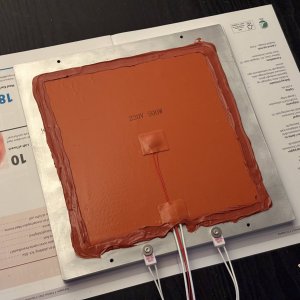
But before all of that, im making the build plate, and once again, i am milling it myself, this time using a large fly cutter, since it is way to big for a facemill, and i did not want it to become taco formed, or have high and low spots, coresponding to how i milled the surface.

436960465_1134010587719595_2136334804105111586_n.jpg

Dont let the pictures fool you, the surface is all smooth and flat (not only due to the coolant), and some rounded corners (radius=2mm), just so i dont cut or nick myself :D and it looks profesional :P


440234214_1594289444702867_5971615703376539143_n.jpg

I also have started printing the difrent parts, the first things to be printed is the toolhead and such, just because i felt so.
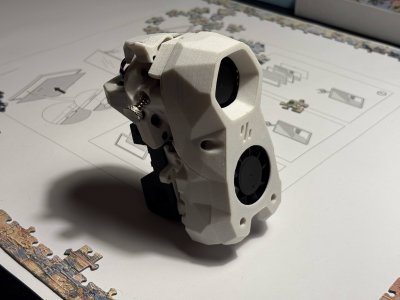
 
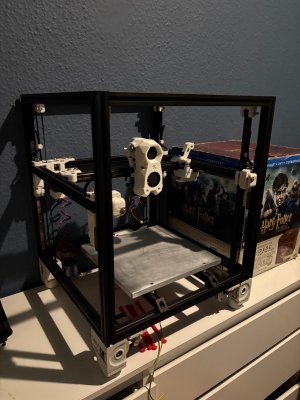
So, after a long time, I finally got around to do some work on my 2.4, first, I have build the Stealthburner, it is quite the chunky boy, compared to what the 0.2 has.

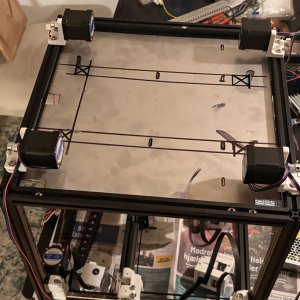
Then I got around to get the build plate finished up, so it could be installed in the frame ( once that was ready ), it might not be pretty underneath, but as long as it works, then I am fine by that, since it is not supposed to move around anyway, and the fact that I made it myself :D

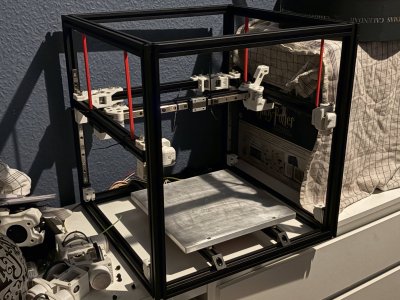
Then it came to the frame, which I think was quite easy to assembly, so too with the gantry, but no installing it in the frame, even with zip ties holding it in place, so I printed some Z Locks by tallman5, and they/it truly did help out, I am absolutely positively surprised in how sturdy it felt, I would really wish, that the Voron team, would have included something like this, to help the build along from the get go.

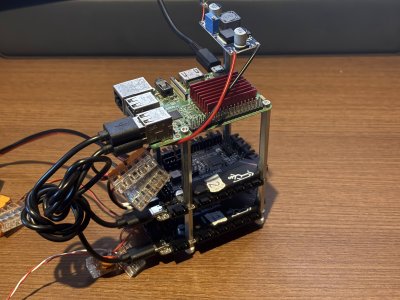
After completing the X, Y and Z, and installing the Stealthburner, it really started to take shape, so I started with tackling the firmware, and getting the 2x MCUs up and running, so everything from there would just be cabling, so I came up with the idea, to just screw everything together, with some leftover hardware, I had laying around, form many years ago, when I was playing with building a raspberry pi cluster, speaking of pies, I had originally intoned on using a BTT Pi, but it the power regulator burned itself out, like some many of these have apparently, so I dug up one of my Pi 3 model B+, that got its power from a buck converter, it is additional wiring, which I had hoped I could skip by using a BTT Pi, but alas, I at least got a refund from it, so instead of scrapping everything from it, I just used the heatsink from it, since, why not, if it work, it works.


IMG_2309.jpg


IMG_2523.jpg


IMG_3082.jpg


IMG_3159 (2).jpg


IMG_4291.jpg
 
So after neglecting my 2.4 for too long, I decided that i wanted to do something about the electronics, originally I had all of the wiring going out to a separate box (like an old Creality CR10) but I never really finished it, it was supposed to be similar to a “normal” CNC Control inspired by HAAS but stripped down, but that idea will have to wait, since I rather want this up and running, instead of just tinkering only, I can always build a separate 3D printed control unit to play around with.

But to start off with the first part of the Electronics Bay, the Deck Panel, and like on my 0.2, I didn’t want to just buy something, if I could manufacture it myself, but unfortunately, I don’t have that much experience working with sheet metal, rather a 3mm stainless steel plate, I got some help from a friend from work who helped me out with the cutting, and from there I would be able to take care of the rest myself ( aka, just drilling some holes ).

Also, the reason I wanted to go with a metal Deck Panel, was so I could use it as a grounding plate for PE, since I am using an AC heated bed, that way, if anything would happen to wires from the bed, then the first thing they would end up touching, would be the frame or the Deck panel, blowing the AC fuse and shutting the whole thing off in an instance. The idea from this actually comes from how some of the electronic inclusions are built at my work.

IMG_0196.JPG


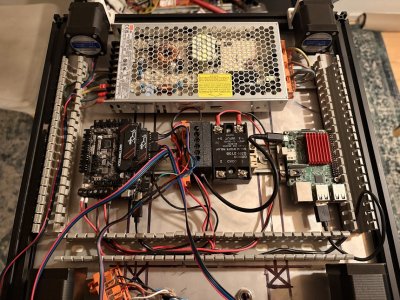
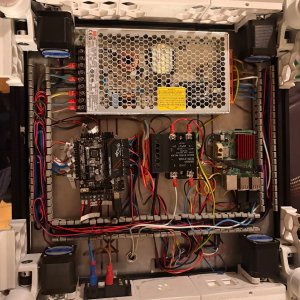
After marking up where I wanted the holes for the DIN Rails to be, I quickly realized that I might have been quite optimistic with the spacing, compared to the parts I had chosen, so to save space, I stacked the 2 SKR Pico boards, one on top of the other, this gave me just enough space to attached to bed relay, and a WAGO DIN mount next to the buck converter for the raspberry pi, another trick I used from my workplace was running the wires from the power supply underneath itself, and “inside” the DIN rail, and into another WAGO DIN mount, this way I could reroute the wires to the other side of the Electronics Bay, freeing up space for the connectors going to the 2 SKR Pico boards.

IMG_0210.JPG

this also allowed me to easily route the PE cable directly from the power supply and onto the screw attached to one end of the DIN rail, and then again on the other side, to the other din rail, ensuring that both din rails are connected to PE together with the Deck Panel and then to the frame of the printer, in retrospective, it does sound like quite a lot of work just for PE, but I rather want to over do it, and not need it, then the other way around.


After wiring everything up, I can definitely say, I don’t think I can get much more crammed in, without risking damaging cables, but it fits, and it works, I just need to get some fans for cooling everything, and wired up the camera and attached some keystones to the back, so it can be connected to LAN, since I don’t know how well the WIFI will work, once I attached the Bottom Panel, that also will be made out of a 3mm stainless steel plate, for the exact same reason as for the Deck Panel, but I will figure that out, when I get to that part.

IMG_0385.JPG
 
Top